AI cloud computing means renting artificial-intelligence capabilities from a cloud provider instead of building them yourself. You get the three things AI needs — powerful processors called GPUs, ready-made AI services, and fully built AI tools — over the internet from Amazon Web Services (AWS), Google Cloud, or Microsoft Azure, and you only pay for what you actually use.
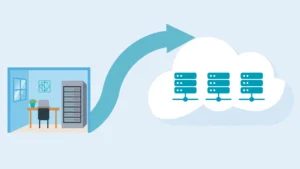
If you have been asking what AI cloud computing is, explained simply, think of it as renting a professional kitchen instead of building one in your house. You would not buy an industrial oven, hire chefs, and install a ventilation system just to cook one special dinner. You book the kitchen, cook your meal, and pay for the hours you used. AI cloud computing works the same way: the big cloud companies built the expensive AI infrastructure, and you rent slices of it.
What Is AI Cloud Computing, Explained Simply?
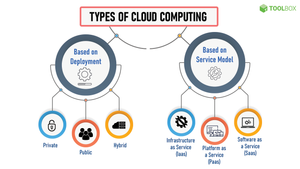
Strip away the marketing and the phrase describes three separate things you can rent:
1. The muscle: raw computing power. Modern AI runs on graphics processing units (GPUs) — chips that can do thousands of calculations at once. One top-end AI GPU costs as much as a car. Cloud providers bought thousands of them, packed them into data centers, and rent them by the hour. This is “GPU cloud.”
2. The building blocks: AI platforms you call with code. Instead of training your own AI model (a project that can cost millions), you call someone else’s model through a simple internet request — an API. You send text in, you get an answer back. AWS calls its platform Bedrock, Google calls its platform Vertex AI, and Microsoft calls its platform Azure OpenAI Service. They are the same idea wearing different brand names: a menu of AI models you can use without owning them.
3. The finished products: AI tools that need no code at all. These are ready-made services where you just upload your data — tools that transcribe audio, read documents, or answer customer questions. You configure them in a web dashboard, no programming required.
Most beginners interact with layers 2 and 3. You only touch layer 1 if you are training your own models, which almost no small business needs to do.
How Do AWS, Google Cloud and Azure Each Run AI?
All three run enormous data centers filled with GPU servers, and all three sell the same three layers above. The differences that matter to a beginner are the names and the starting prices, not the technology underneath.
Here is one task — transcribe a 30-minute customer-support call and write a three-line summary — done the “AI cloud” way on each platform:
- AWS: Upload the recording to Amazon Transcribe, which turns the audio into text. Then send that text to a model on Amazon Bedrock, which writes the summary. Transcribe charges per minute of audio; Bedrock charges per thousand words processed.
- Google Cloud: Upload the recording to Cloud Speech-to-Text, then summarize with a Gemini model through Vertex AI. Same flow, different names on the console.
- Microsoft Azure: Upload to Azure AI Speech, then summarize with a GPT model through Azure OpenAI Service. If your company already uses Microsoft 365, this path usually feels the most familiar.
Notice the pattern: each cloud sells a speech service and a text model, and you chain them together. Once you see that pattern, the three platforms stop feeling like different planets and start looking like the same grocery store with different packaging.
Why Is Everyone Suddenly Obsessed With This?
Two numbers explain the hype. Training a frontier AI model from scratch can cost tens or even hundreds of millions of dollars in computing power alone — money only a handful of companies have. But calling an already-trained model costs fractions of a cent per request. AI cloud computing is the mechanism that turns a hundred-million-dollar investment into something a freelancer can use for pennies.
That is why every cloud provider is racing to sell it: AI services are the fastest-growing product in cloud history, and they turn the cloud from “where websites live” into “where intelligence is rented.”
How Much Does AI Cloud Computing Cost in Practice?
This is the question everyone is afraid to ask, so here are honest ranges as of 2026:
- Using a model through an API (layer 2): A small customer-service chatbot answering roughly 10,000 short messages a month typically costs somewhere between $10 and $60, depending on which model you pick. Choosing a smaller, cheaper model instead of the flagship one is the single biggest lever on your bill.
- Ready-made services (layer 3): Audio transcription runs about $1–$2.50 per hour of audio. Document reading services charge per page, often a few cents.
- Renting raw GPUs (layer 1): This is the expensive one. A top-tier AI GPU instance can cost tens of dollars per hour on demand — easily $2,000+ a month if left running around the clock. Beginners should not start here.
The mini-test worth running before you commit to anything: most of these services let you process a handful of free requests or a small free quota first. Run your exact task — your actual audio file, your actual customer questions — through the free allowance and see the real output quality. A five-minute test tells you more than an hour of reading pricing pages.
How Do I Try Cloud AI Without a Surprise Bill?
The fear of a $500 invoice keeps many beginners away, and it is a fair fear. Four habits eliminate it:
- Set a billing alert at $0 the day you create the account. All three clouds let you get an email the moment any charge appears. Do this before touching a single AI service.
- Use the console, not code, at first. The web dashboards show prices next to most actions. Code tutorials often leave resources running.
- Pick the smallest model that does the job. Providers offer “lite” and “flash” model versions that cost a tenth of the flagship. For summarizing, classifying, and drafting, the cheap ones are usually plenty.
- Delete or stop GPU instances the moment you are done testing. The $30-an-hour meter runs whether you are using the machine or just logged in. This is where surprise bills actually come from.
Do I Need the Cloud, or Can I Run AI on My Own Computer?
It depends on the job. Chatting with a small open-source model, transcribing short audio files, and experimenting are all possible on a decent home computer or even a laptop these days. The cloud wins when you need serious power (training models, processing thousands of files), when you need it available 24/7 for customers, or when you would rather pay per use than buy a $2,000 graphics card. We compare both paths honestly in our guide to cloud AI vs. running AI locally.
Frequently Asked Questions
Is AI cloud computing the same thing as “the cloud”?
Not exactly. “The cloud” broadly means renting computing, storage, and software over the internet. AI cloud computing is the AI corner of that — renting GPUs, AI models, and AI tools specifically. Think of it as a department inside the cloud store.
Which cloud is best for AI beginners?
There is no universal winner, but a practical rule: if your company already uses Microsoft products, start with Azure; if you live in Google Workspace or Android, start with Google Cloud; if you want the widest menu of services and tutorials, start with AWS. The skills transfer — the concepts are the same everywhere.
Can a small business actually afford AI cloud computing?
Yes, for layers 2 and 3 — the API and ready-made-tool layers. Automating a few hours of weekly busywork with AI services typically costs less than a coffee subscription. Raw GPU rental is the expensive layer, and most small businesses never need it.
Do I need to know machine learning to use AI cloud services?
No. That is the entire point of the cloud model. Machine-learning expertise is needed to build the services; using them takes the same skills as using any web app or simple API. The cloud provider did the hard part — you just rent the result.